BCBSTX
- 4.6
- Rating
- 1.00M
- Installs
- Free
- Price

 Analysis by App-foxy
BCBSTX is the kind of medical app I would judge less by its first impression and more by whether it remains useful after the first few days. Developed by Blue Cross and Blue Shield of Texas, it is designed around member information rather than general health education, so its value depends heavily on whether you use BCBSTX for your health coverage. I found that distinction important: this is not a replacement for a doctor, a symptom checker, or a general wellness tracker. It is a practical companion for handling the administrative side of being insured.
The app is free and available to Everyone, which makes trying it low-risk. It has built a substantial audience, with over one million installs, a 4.7 average from around 7.6 thousand ratings, and roughly 1.8 thousand written reviews. Those figures suggest that many members find it worthwhile, but they do not mean every user will need it every week. My experience is that its strongest argument is not constant engagement. It is the ability to keep important coverage information close when a medical appointment, pharmacy visit, or insurance question suddenly becomes urgent.
What BCBSTX feels like after the first week
During the first week, the appeal is straightforward. Instead of searching through paperwork, email, or a browser bookmark, I can open one place intended for Blue Cross and Blue Shield of Texas member information. That focus gives the app a clear role. When I want to check something related to my coverage, I do not have to begin with a broad web search and work out which page applies to me.
You May Also Like

 Blood Strike: 2.5 Anniversary
Blood Strike’s Loadouts Turn Every Drop Into a Tactical Gamble
A close look at Blood Strike’s custom loadouts: how fast access to signature weapons reshapes its battle royale rhythm, rewards preparation, and narrows the gap between fights.

 Pandora - Music & Podcasts
Pandora’s Music Is Easy to Start, but Harder to Recover
Pandora’s strength is its low-effort path from a seed to a station. Its weak spot is how much confidence it asks you to place in connection, setup, and quiet recovery.

 8 Ball Pool
 Is Built on Rivalries, Rematches, and Routine
A close look at the rivalries, rematches, shared routines, and unanswered safety questions that turn a quick pool match into a persistent mobile community.

 Samsung Music
’s Quiet Strength Is Playing What You Already Own
Its reach comes less from spectacle than from dependable access to a personal library. That simplicity is both the app’s strongest retention engine and its ceiling.

 AccuWeather: Weather Radar
AccuWeather Review: A Quick, Clear Forecast for Everyday Decisions
For everyday plans, the best forecast is the one you can understand quickly. AccuWeather makes rain timing, radar, and local conditions easy to act on, with a few trade-offs.

 Hill Climb Racing
Why Hill Climb Racing Still Turns Crashes Into One More Run
A tiny car, a bumpy hill and one more upgrade: Hill Climb Racing keeps resurfacing because its simple chaos makes every near-miss feel personal.
More From Our News Desk



The most useful early habit is opening the app before I actually need it. I would sign in, look around the member area, and make sure I understood where the information I commonly need is presented. This matters because an insurance app is rarely opened in a relaxed setting. It is more likely to be used in a waiting room, at a reception desk, or while speaking with a pharmacy. Familiarity saves more time than repeatedly downloading the app only when a question appears.
For a new member, the first-week experience is also a test of expectations. BCBSTX is not trying to be a universal medical assistant. Its purpose is narrower and, in my view, more useful when treated honestly: it puts your relationship with the insurer into a mobile format. If you expect detailed medical guidance, extensive symptom analysis, or a complete personal health journal, you may feel that the app is limited. If you want member-facing information available without carrying every document, the design makes more sense.
A realistic example is a routine appointment at a clinic I have not visited before. The receptionist asks for coverage information, and I do not want to search through old messages or open a laptop. Having the app already installed gives me a better chance of finding the relevant member information quickly. The benefit is not dramatic, but it is exactly the sort of small convenience that can remove friction from an already stressful moment.
I also appreciate that the app is clearly tied to a named insurer rather than pretending to cover every possible plan. That specificity can make the experience less confusing for eligible members. At the same time, it creates the first important trade-off: people outside the Blue Cross and Blue Shield of Texas member system have little reason to keep it installed. This is a membership tool, not a general-purpose medical download.
Where the early convenience is strongest
The app earns its place quickly when I need insurance-related information away from home. A phone is easier to carry than a folder of documents, and the app gives that information a dedicated destination. I would especially value it before traveling locally, changing doctors, visiting a new pharmacy, or preparing for an appointment where coverage details may come up.
Another practical use is reducing the number of separate places I rely on. Many people keep insurance information in a wallet, a paper file, an email account, and a browser. BCBSTX cannot eliminate every document or conversation, but it can become the first place I check. That simple workflow is more sustainable than trying to remember which website, PDF, or message contains the latest detail.
There is also a psychological benefit. Health administration often feels harder than it should because the information is scattered and the timing is poor. A dedicated app does not solve every insurance problem, but it can make the first step feel less intimidating. I found that useful precisely because the app is focused. It does not ask me to browse unrelated health content before reaching the member side of the experience.
What it does not replace
I would not use BCBSTX as my only source of medical advice. If I have symptoms, need an urgent assessment, or want help understanding a diagnosis, I would contact an appropriate healthcare professional. The app belongs to the administrative layer of healthcare. That distinction is worth remembering because the word “medical” can create an expectation that an app will actively interpret personal health problems.
I would also avoid assuming that having member information on a phone removes the need for careful confirmation. Insurance situations can depend on the provider, service, plan details, and timing. The app may help me begin the process, but a complicated billing question can still require direct contact with the insurer or a conversation with the healthcare office. For simple access, it is convenient; for unusual situations, it is one tool in a larger process.
Why the value changes from month to month
After the novelty fades, BCBSTX becomes more of a utility than a destination. I do not expect to open it for entertainment or daily motivation, and that is not a criticism. The right question is whether it remains dependable when an insurance task appears. For a member with recurring appointments, prescriptions, family healthcare needs, or regular plan questions, the answer is more likely to be yes.
My preferred long-term habit would be light but deliberate. I would keep the app available, check it when preparing for an appointment, and revisit it when my healthcare circumstances change. That is more realistic than forcing a daily routine. A medical coverage app does not need to create constant engagement to be valuable; it needs to be ready at the right moment and easy enough to use under pressure.
One useful monthly workflow is to prepare before a healthcare visit rather than waiting until check-in. I would open BCBSTX at home, review the member information I expect to need, and make sure my phone is charged. This turns an uncertain, rushed interaction into a short preparation step. It also helps me notice when I may need another document or a direct answer before arriving at the appointment.
For households, the value can be more uneven. Someone managing healthcare for a partner, child, or older relative may appreciate having a mobile access point, but the app does not automatically remove the complexity of handling more than one person’s information. I would be careful about assuming that one login or one screen solves every family workflow. The practical advantage depends on how the coverage and member access are organized for the people I am helping.
BCBSTX is also more useful during periods of change than during quiet months. A new provider, a different appointment pattern, or an unexpected pharmacy issue can make member information suddenly important. In those moments, an app that has been maintained on the phone is more valuable than one that has been deleted because it seemed unnecessary during a calm period.
How it compares with ordinary alternatives
The usual alternatives are paper cards, saved documents, a mobile browser, phone calls, and help from a clinic’s administrative staff. BCBSTX does not make those options obsolete. Instead, it sits between them. Compared with paper, it is easier to keep with me but depends on my phone and account access. Compared with a browser, a dedicated app can feel more direct because it is separated from unrelated tabs and search results.
A phone call is still better when I need a detailed explanation, a decision on an unusual case, or help resolving confusion. A clinic’s staff may also be able to clarify what they need for a particular visit. I see the app as the fastest first stop for member information, not as a universal replacement for human support.
That comparison explains why the app can earn lasting space without being used constantly. Its advantage is convenience at a specific point in the healthcare journey. If I rarely need coverage information and already have a reliable paper or browser-based system, the difference may be too small to matter. If I regularly move between appointments, providers, or pharmacies, the dedicated access point becomes more convincing.
The maintenance burden is small, but not zero
Keeping BCBSTX useful requires a little maintenance. I would keep the current version installed; the app is listed at version 7.17.0, and staying current is sensible for an app that handles member-facing information. I would also avoid waiting until an emergency to remember my sign-in details. A locked account or forgotten credentials can erase the convenience of having the app ready.
Phone storage is another consideration. Because the app is free, the decision is not about a subscription fee, but every installed app still competes for attention and space. I would keep it if I were an active member or expected upcoming healthcare needs. If I no longer used Blue Cross and Blue Shield of Texas, removing it would be reasonable rather than keeping an inactive insurance app out of habit.
I would also review the app after major personal changes. A new plan, a change in employment, a move, or a different healthcare routine can affect how often it helps me. The app itself may remain perfectly functional while my reason for using it changes. That is an important maintenance distinction: sometimes the burden is not updating the software, but remembering to reassess whether it still belongs in my daily toolkit.
The minimum operating-system requirement is iOS 9 or later, which gives it broad compatibility with older Apple devices. For someone using an older phone, that can be reassuring. Still, compatibility alone does not guarantee a smooth experience on every aging device. I would judge it alongside the phone’s general reliability, available storage, and ability to handle account-based apps comfortably.
Where fatigue can appear
The biggest source of fatigue is the irregular nature of insurance tasks. I may not open BCBSTX for weeks, then need it immediately while dealing with a time-sensitive appointment. That pattern makes the app easy to forget. Its long-term success depends on being discoverable and familiar when I return, not on persuading me to build a daily habit that does not fit the job.
Another possible frustration is the gap between information access and problem resolution. Seeing member information can answer a basic question, but it may not settle a complicated dispute or explain every healthcare cost. If I open the app expecting a complete answer to a difficult billing matter, I may leave disappointed. I would use it to gather context first, then escalate when a person or healthcare office is better equipped to help.
Account access can also become a point of friction. Any member-focused app is only helpful if I can get into it when needed. I would therefore test the login process during a calm moment, not at a reception desk. If I share responsibility for another person’s care, I would be especially careful about understanding whose information I am viewing before relying on it.
There is a subtler kind of fatigue too: administrative overload. Healthcare already involves appointments, messages, documents, and reminders. Adding another app can feel like one more obligation. BCBSTX avoids some of that problem by having a narrow purpose, but I would still resist checking it without a reason. Its best role is quiet readiness, not another notification-driven routine.
Who should keep it installed
I would recommend keeping BCBSTX installed if I am a Blue Cross and Blue Shield of Texas member who attends appointments, manages prescriptions, supports a family member with healthcare needs, or wants member information available away from home. It is especially practical for people who dislike carrying paper documents or who often find themselves needing insurance details at inconvenient times.
I would be more selective if I rarely use healthcare services and already have a dependable alternative. The app may still be worth installing before an upcoming appointment, but it does not need to become a permanent part of my phone simply because it is free. Likewise, someone looking for health education, symptom interpretation, fitness tracking, or emergency guidance should choose a tool built for those purposes instead.
The app is also not the right choice for someone who is not covered through Blue Cross and Blue Shield of Texas. Its narrow connection to the developer is its strength for eligible members and its fundamental limitation for everyone else. A general health app or the official tool from another insurer would be a better fit in that situation.
My long-term verdict
BCBSTX earns lasting space on my phone when I treat it as a quiet insurance utility rather than a daily health companion. The first-week appeal comes from having member information in a dedicated mobile location. The month-to-month value comes from being prepared for appointments, pharmacy questions, and changes in healthcare routines. Its maintenance burden is modest, provided I keep access details manageable and reassess its usefulness when my coverage changes.
Its limitations are equally clear. It cannot replace medical professionals, detailed customer support, or careful attention to complicated coverage situations. It may also feel unnecessary during long stretches when I have no healthcare administration to handle. Those are not reasons to dismiss it; they are reasons to use it with realistic expectations.
Blue Cross and Blue Shield of Texas has kept the app available since December 17, 2010, and its current version is 7.17.0. For me, that longevity matters less as a badge than as evidence that this is an established member tool rather than a novelty I would install once and forget. I would keep it because it can save time at exactly the moment when insurance information is hardest to locate, while accepting that its value is occasional and practical.
My recommendation is simple: if you are a BCBSTX member, install it before you need it, learn where your essential member information appears, and keep it ready for real healthcare moments. If you want a broad medical advisor or a daily wellness experience, choose something else. For its intended job, however, BCBSTX has enough recurring usefulness to justify a permanent place on the phone.
In the end, BCBSTX works best when it disappears into the background until healthcare administration brings it forward. That is not the kind of app I open for novelty, but it is the kind I am glad to have prepared when a routine appointment suddenly requires information I do not want to hunt for.
FAQs for BCBSTX
01What is BCBSTX and what services does it offer?
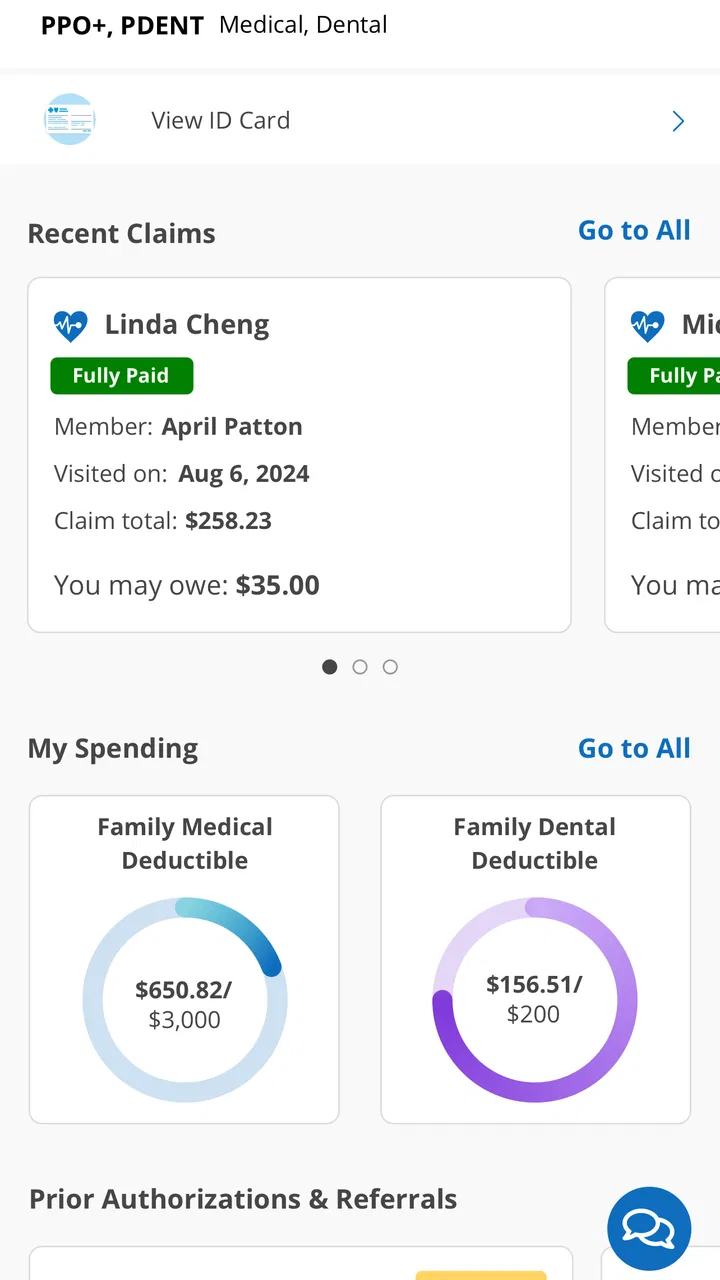
BCBSTX, or Blue Cross and Blue Shield of Texas, is a health insurance app providing users access to their medical benefits, claims, and coverage details. It offers features like finding in-network doctors, viewing digital ID cards, and accessing wellness resources. The app is designed to simplify managing health insurance needs conveniently from your mobile device.
02How secure is my personal information on the BCBSTX app?
The BCBSTX app employs robust security measures to protect users' personal information. This includes data encryption, secure login processes, and compliance with HIPAA regulations. Regular updates and security patches are implemented to ensure the safety and privacy of users' sensitive health and insurance data.
03Can I use the BCBSTX app to make payments or view my billing information?
Yes, the BCBSTX app allows users to view billing statements and make premium payments directly from the app. It provides a seamless experience to manage your financial transactions related to your health insurance plan, ensuring that you can easily keep track of your payment history and upcoming bills.
04Is the BCBSTX app compatible with both Android and iOS devices?
The BCBSTX app is available for both Android and iOS devices. Users can download it from the Google Play Store or the Apple App Store, ensuring broad accessibility regardless of your device preference. Regular updates ensure compatibility with the latest operating system versions and new device features.
05What should I do if I encounter issues or need support using the BCBSTX app?
If you encounter any issues with the BCBSTX app, you can access support through the app itself or by contacting customer service. The app includes a help section with FAQs and troubleshooting tips. For further assistance, users can reach out to BCBSTX customer support via phone or email.
Pros
- User-friendly interface for easy navigation.
- Comprehensive coverage details accessible instantly.
- Secure access with strong data protection.
- Customizable notifications for personal updates.
- 24/7 customer support via chat and call.
Cons
- Limited offline functionality for remote access.
- Occasional slow loading times reported.
- Some features require frequent updates.
- User reports of login issues occasionally.
- Limited integration with third-party apps.

BCBSTX
Gallery